ReportCard by 360Works Your FileMaker file, graded.
A FileMaker health check for your app. See how it scores across 17 areas and get a clear plan for what to fix first to make it faster, safer and cleaner.
A full checkup health check for your FileMaker app.
360Works ReportCard is a tool that does ReportCard by 360Works is a FileMaker audit tool. It does a deep, intelligent analysis on of your FileMaker app. It provides a report of performance problems, security issues, and general code quality (e.g. broken scripts, bad naming conventions, and data model mistakes) such as broken scripts, bad naming conventions and data model mistakes. The report card includes an executive summary, top priority issues to fix, and a comprehensive list of every problem found with explanations (often 50-100 pages).
Probably the most valuable and important feature of ReportCard is the security section. The security audit is probably the most valuable part of ReportCard. You’ll be alerted to simple issues like missing passwords, hard-coded passwords / API keys, and over-use of [Full Access] privileges. The report will also dive into more complex issues like editable fields used for record-level security, potential abuse for full-access scripts that take parameters, and weak passwords (by running a local penetration test, coming soon).
Before committing to a rebuild, use ReportCard to find the technical debt in your legacy FileMaker app, then help optimize, modernize, and cleanup your old legacy FileMaker app clean it up, or use it during new development to act as a consultant on best security practices and spot problems before they go into production.
From upload to action plan.
Three easy steps to get your check started start your health check.
- UploadUpload your file(s) and get a price quote at no cost.
- ReviewYour app is graded across 17 areas, then a second pass checks every finding.
- ReportDownload your report card and prioritized action plan.
Structure only. Never your records.
ReportCard reads how your file is built: tables, fields, relationships, scripts, layouts and security settings. It never reads the data in your records. You can upload an empty clone, or save a copy as XML and upload that. It keeps your records out of it, and no FileMaker password is needed.
Answers you can act on.
Every report opens with your overall score and a summary, then a prioritized plan where each item explains why it matters, what it affects, and how big the job is.
- Overall score out of 100
- Executive summary
- Scorecard for all 17 areas
- Prioritized action plan
- A card for every top finding: why it matters, impact, effort
What we grade.
Your overall score is out of 100, built from three pillars.
Performance · 55%
Nine areas that decide how fast your FileMaker app runs. Indexing and storage, calculations, relationships, scripts, layouts and rendering, network and hosting, containers and file size, startup and triggers, and searches and finds.
Security · 30%
Four areas that show how secure your FileMaker app is. Accounts, privileges, passwords sitting inside scripts, encryption, and who can change what.
Quality · 15%
Four areas: naming consistency, script robustness, organization and tidiness, and your data model.
Each area starts at 100 and loses points for each type of problem found, weighted by its most serious case.
Highlights
When teams use it.
Tech debt cleanup
Inherited a file someone else built? Get a ranked list of what to clean up first.
Speed
Find the calculations, layouts and scripts that slow remote users down.
Ready to scale
Know what will strain before you add users, data or locations.
Security audit
See exposed passwords, open accounts and privilege gaps in one place.
Second opinion
Check a contractor's work before you sign off, or get an outside view of your own.
Before an upgrade
Find what needs attention before you move servers or upgrade FileMaker.
Locked down by design.
Isolated
Every review runs in its own sealed-off environment.
No internet access
The review can't go online, so your file stays put.
Walled off
ReportCard can't reach any other system, ours or yours.
Encrypted
Everything is encrypted.
We do not retain your data
Your uploaded files are deleted as soon as your review is done.
Common questions.
Yes, this is fully supported.
No. You upload your empty FileMaker file, and ReportCard reads only its structure: tables, fields, relationships, scripts, layouts and security settings. If you upload a file that is not empty, ReportCard never reads the data in your records.
ReportCard uses AI, and every file is different, so the price depends on how much work your file takes. We read your file for free and give you a final quote. The review runs only after you pay.
Sample Report
 ReportCard
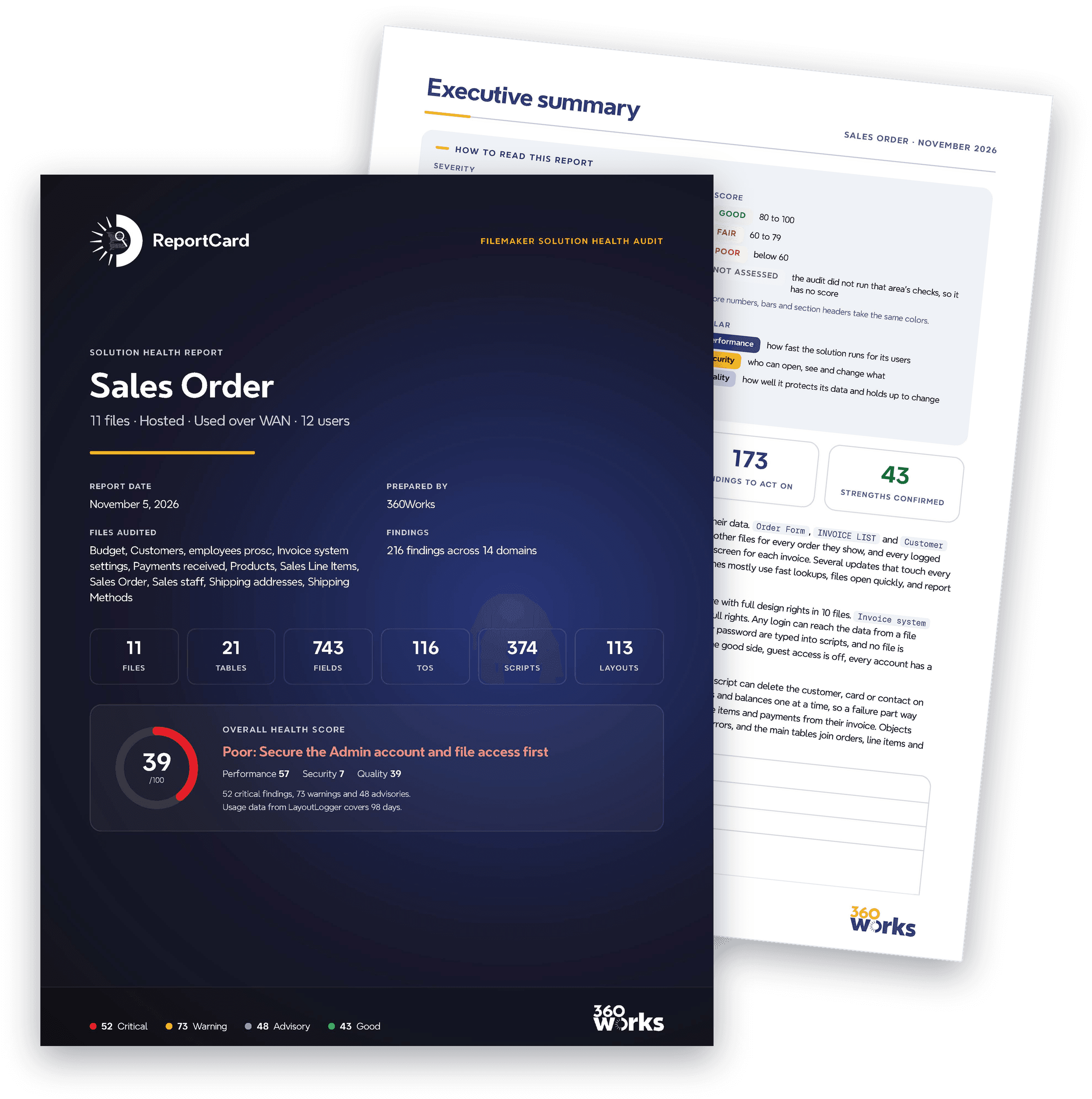
Usage data from LayoutLogger covers 98 days.

- Critical Serious harm to speed, security or data now.
- Warning A real cost or risk.
- Advisory A small cost or a gap in good practice.
- Good Sound practice the audit confirmed.
- GOOD 80 to 100
- FAIR 60 to 79
- POOR below 60
- NOT ASSESSED the audit did not run that area's checks, so it has no score
- S under a day, usually a single setting or step
- M days: rework of a script, layout or relationship
- L weeks: schema or architecture change
- Performance how fast the solution runs for its users
- Security who can open, see and change what
- Quality how well it protects its data and holds up to change
Performance (80). Customer detail is the busiest Customers screen. For every order it shows, it lists and adds up all of that order's line items again, and users there already wait up to 0.85 s at a time. The aging report, statements and sales reports also recompute totals for every order they include. Your pre-audit questionnaire says users connect over the internet, so all of this data crosses the network. Batch scripts redraw the screen at every record, and Mark found set done has blocked users for up to 3.2 s at a time. On the positive side, the busy invoice lists read saved totals, and opening the files runs only short scripts.
Security (73). On the positive side, the Guest account is off in every file, every active account has a password, and the integration accounts are tightly limited.
Quality (43). The product lookup button on Order Form silently fails to add the product, so an order can be saved without the item the user picked. Payment, credit and invoice scripts can stop halfway and leave money and stock figures that disagree. Users can edit invoice, credit card and shipping address numbers, and one such edit can detach an invoice's line items and payments. Line items link to products by an editable item code, and invoices keep shipping rates in fixed slots. On the positive side, newer tables use protected record IDs, and the newer invoice-sending scripts report whether they succeeded.
- SEC-016.1 ·
- CALC-002.2 · Aging report rows run a four-deep chain of unstored calculations
- SEC-015.1 ·
- SCR-002.1 · Record loops and list-view scripts redraw the window at every step
- DATA-001.1 · Order, credit card and shipping address keys can be edited by users
- SEC-009.1 ·
- SEC-012.1 ·
- CALC-002.1 · Order total recalculates line-item sums in every portal and list row
- CALC-001.1 · Unstored line-item list repeats in every order row on Customer detail
- CALC-002.3 · Ten form fields stack unstored calculations on top of related sums
- ORG-007.1 · Sales Line Items has 11 value lists and custom functions nothing uses
- ROB-003.1 · Card-charging and invoice batch loops can be stopped part way
- SEC-006.2 ·
- CALC-002.4 · Client statement export rows chain unstored text calculations
- CALC-001.2 · Sales reports sum line items again in every order row
- ROB-005.1 · Payment, credit and invoice writes across tables have no transaction
- WAN-001.1 · Three wide tables load 80 to 88 fields per row in busy list views and portals
- SCR-003.1 · Two INVOICE LIST batch scripts refresh the window on every record
- WAN-005.2 · Sales Order record access runs a per-record text search in unused sets
- ROB-008.1 · Product lookup button pastes into a table occurrence that no longer exists
- and 52 more in the action plan
- IDX-001.1 · No searched field has its indexing switched off
- IDX-005.2 · Search criteria live in global fields and settings in a regular field
- CALC-001.8 · Busy invoice lists read stored totals kept current by scripts
- CALC-003.1 · Report totals sit in summary parts, not in list rows
- CALC-004.2 · Modification stamps use auto-enter, not calculations
- REL-001.4 · Most-used screens reach their data within two relationships
- REL-002.1 · Every resolvable far-side key is stored and indexable
- REL-004.1 · Cartesian joins to the Globals table reach only a global field
- SCR-005.1 · Batch updates and PDF generation already run on the server
- LAY-001.3 · Most layouts stay small, with light conditional formatting
- and 24 more in the domain sections
Start with SEC-016.1 and SEC-015.1: Next come the repeated totals on reports and Customer detail (CALC-002.2, CALC-002.1, CALC-001.1) and the batch scripts in SCR-002.1, which already block users. After those, the editable invoice numbers in DATA-001.1 can detach line items and payments from their invoices.
- Why it matters
- The field's name says it holds a JSON payload, and it sits in a table called API Log, which scripts write to. FileMaker updates the field's index each time a log record is committed, yet nothing in the scripts, relationships or value lists searches it, so the index costs writes and gives no benefit. The call rests on the field and table names.
- Impact
- Each log record written pays for maintaining an index nobody searches, and the file and its backups carry the index data. The cost grows with the log.
- Evidence
- API Log::providedJSON (field, Customers): datatype Text, autoIndex="True" index="Minimal"; no join, find, sort, value list or ExecuteSQL clause uses it. Written by script (step 4) and (step 127); shown on layout "API Log".
- Why it matters
- Each product record stores up to ten manufacturers, and ten matching item numbers, in the repetitions of one field. The inventory print script sorts by Manufacturer and two value lists read these fields, but a sort on a repeating field only looks at the first repetition, and a repeating field cannot be joined, searched or summarized by position the way related records can.
- Impact
- Products with more than one manufacturer are only reachable through the first one when sorting; the other manufacturers cannot be found or reported on as rows. Every product record also carries ten slots whether or not it uses them.
- Evidence
- Products::Manufacturer (field, Products): Stored Normal Text field, maxRepetitions="10", index Minimal. Script "Print Inventory List" step 2 (Sort Records) sorts by Products::Manufacturer then Products::Item #; the script is run from a grouped button on a layout. It is also the source field of value list "Manufacturers" and is placed on layouts Layout #1, All data, Find screen, Print List and Quick List.
- Products::Manufacturers item number (field, Products): Stored Text field, maxRepetitions="10", index Minimal. It is the source field of value list "Manufactuers Item numbers" (FromField, sorted).
- Why it matters
- The Start/Stop script writes the current time and date into two ordinary stored fields, Current time_temp and Current date_temp, and reads them back a few steps later. They are scratch values for one run of the script, but they are saved on every line-item record, where everyone can see them and the date field also keeps an index.
- Impact
- Each press of Start/Stop writes two extra stored values, and an index entry for the date, on a record that is shared by all users, only to use them in the next steps. A $variable would avoid the stored values.
- Evidence
- Sales Line Items::Current time_temp (field, Sales Line Items): Normal Time field, global="False". Script Start/Stop sets it at step 0 (Get(CurrentTime)) and reads it at steps 3, 8 and 11
- Sales Line Items::Current date_temp (field, Sales Line Items): Normal Date field, global="False", index All. Script Start/Stop sets it at step 1 (Get(CurrentDate)) and reads it at steps 4, 8 and 12
- Start/Stop (script, Sales Line Items): Steps 0 and 1 write the scratch fields on the current record; steps 3, 4, 8, 11, 12 read them back within the same script. A $variable would serve; Current state (step 5, 7) is genuine per-record state.
- Why it matters
- The credit card pick list shows and sorts by Description, a calculation whose result FileMaker is not storing. Every time the list opens, FileMaker has to evaluate the formula for each card and sort the results, because an unstored calculation has no index. The formula only uses fields on the card's own record, so it could be stored.
- Impact
- Opening the credit card choices evaluates the formula for every card in the related set instead of reading an index. The cost grows with the number of cards on file for the customer and is small at typical sizes, so this is a minor inefficiency.
- Evidence
- Credit card::Description (field, Customers): Unstored calculation (storeCalculationResults="False"): Card type & " ending with " & Last 4 digits & If(IsEmpty(Label);""; " (" & Label & ")"). References only fields of its own record (Card type, Last 4 digits, Label), no Get function, no global, no related field, so it could be stored and indexed.
- Credit card choices (value-list, Sales Order): FromField value list: primary field Credit card::#ID (hidden), secondary field Credit card::Description shown and sorted (sort="True"); ShowRelated value="True" through "Sales Order | Payments received". Used by a field object on a Sales Order layout.
- Why it matters
- These 8 text fields have names that suggest longer free text (notes, comments, instructions, descriptions, a JSON parameter) and carry a full or minimal index, yet no script, relationship, value list or sort in the solution searches them. They are listed on their names alone; people may still search some of them by hand.
- Impact
- Every commit that changes one of these fields also updates its index, and the indexes add to file size and backups. The cost is probably small.
- Evidence
- Payments received::JsonScriptParam (field, Payments received): Text, index="All"; name suggests JSON; set by SetAndGetPayments (step 17) and PaymentDeclined (step 27); not in any find, sort, join or value list
- Payments received::Charge description (field, Payments received): Text, index="All"; not in the usage map
- Customers::•••Misc Notes (field, Customers): Text, index="All"; not in the usage map
- Customers::•••Industry Description (field, Customers): Text, autoIndex="True" index="Minimal"; not in the usage map
- Customers::lead_projectdescription (field, Customers): Text, autoIndex="True" index="Minimal"; not in the usage map
- Sales Order::Invoice comment (field, Sales Order): Text, index="All", auto-enter from Invoice system settings::Default invoice comment; not in the usage map
- Sales Order::Special Instruction (field, Sales Order): Text, index="All", auto-enter calculation; not in the usage map (LayoutLogger: focused 108 times, 1.2 h in all, data entry not search)
- Sales Line Items::Notes (field, Sales Line Items): Text, index="All", auto-enter from Products::Description; not in the usage map (LayoutLogger: focused 26 times, 0.2 h in all)
- Why it matters
- These 7 stored fields hold a list of like items in repetitions: shipping rate and weight tiers (9 repetitions), hourly rates and bonus thresholds per employee (8), and a manufacturer key code (10). A repeating field cannot be joined, searched or summarized by row, and every record carries all the repetitions.
- Impact
- No find, sort or relationship uses these fields today, so there is no slowdown now; the design limits reporting on the tiers and means each record carries unused slots. The shipping lookups on Sales Order point at a missing source field.
- Evidence
- employees::Hourly (field, employees): Stored Number, maxRepetitions="8"; shown on layout Layout #2; not in the usage map
- employees::Hourly bonus threshold (field, employees): Stored Number, maxRepetitions="8"; shown on layout Layout #2; not in the usage map
- Products::Manufacturer key code (field, Products): Stored calculation "Manufacturer & Manufacturers item number", maxRepetitions="10", index Minimal; not in the usage map
- Sales Order::Ship rates_lookup (field, Sales Order): Stored Number, maxRepetitions="9", auto-enter lookup whose source field reference is <Table Missing>
- Sales Order::Ship weights_lookup (field, Sales Order): Stored Number, maxRepetitions="9", auto-enter lookup whose source field reference is <Table Missing>
- Shipping Methods::Rate (field, Shipping Methods): Stored Number, maxRepetitions="9", index All; not in the usage map
- Shipping Methods::Pounds (field, Shipping Methods): Stored Number, maxRepetitions="9"; not in the usage map
- IDX-001.1No searched field has its indexing switched off Finds, sorts and relationships that the scripts, value lists and layouts rely on can all use an index on the fields they touch; there are no switched-off indexes behind a slow or empty search.
- IDX-005.2Search criteria live in global fields and settings in a regular field Users do not collide on search state, and the persisted import sequence is not lost when a hosted session ends.
- Why it matters
- Sales Order::processed is an unstored calculation that builds a list of the Active status of every line item of an order each time it is shown. On Customer detail it sits in the row of the Sales Order portal, and on Print Invoice List in the list body, so each row a user sees makes FileMaker fetch all of that order's line items from the Sales Line Items file before it can draw the value.
- Impact
- Each time Customer detail opens a customer or redraws the portal, FileMaker fetches every line item of every order shown and builds a list for each row. Your pre-audit questionnaire says users connect over the internet, so those line items cross the WAN. Customer detail is the solution's busiest Customers screen, and users there already wait on blocks of up to 0.85 s.
- Evidence
- Sales Order::processed (field, Sales Order): Unstored calculation (context Sales Order): Let ([ list = List ( New line items::Active status ) ; active = PatternCount ( list ; "Active" ) ] ; Case ( active = 0 ; "Yes" ; "No" )). New line items is an occurrence of the Sales Line Items table in the Sales Line Items file, so each evaluation lists every line item of the order.
- Customer detail (layout, Customers): Shows Sales Order::processed in the Body inside the Sales Order portal (5 rows visible), so it evaluates once per portal row. Usage: 755 visits, open for 23 h in total, 6 accounts; blocked 70 times, 7.6 s in all, longest 852 ms.
- Layout #1 2024-05-28 archive (layout, Customers): Same Sales Order portal (5 rows) with Sales Order::processed in each row; the layout is in the layout menu.
- Print Invoice List (layout, Sales Order): List layout (Header 65 pt, Body 23 pt, Footer 18 pt) showing Sales Order::processed in the Body, once per order row.
- Sort By Processed (script, Sales Order): Sorts by Sales Order::processed, and the script Submit all orders runs a Perform Find on it; that sort and find cost belongs to the sort and find checks, not to this finding.
- Why it matters
- Order total is an unstored calculation that just reads Merchandise total, which is itself an unstored sum of every line item's Discounted Total. Each display of Order total runs the line-item sum. It shows in each row of the orders portal on Customer detail and in each row of Print Invoice List, so every row pays for a full sum over that order's line items.
- Impact
- Opening a customer on Customer detail sums the line items of every order shown in the portal, on top of the line-item list that the processed field builds in the same rows. Your pre-audit questionnaire says users connect over the internet, so each sum fetches line items across the WAN. That adds to the waits users already see on this heavily used screen.
- Evidence
- Sales Order::Order total (field, Sales Order): Unstored calculation: Merchandise total (the rest of the formula is a // comment). Chain depth 2: Order total → Merchandise total.
- Sales Order::Merchandise total (field, Sales Order): Unstored calculation: Sum(New line items::Discounted Total), an aggregate over every line item of the order (Discounted Total is stored in Sales Line Items).
- Customer detail (layout, Customers): Shows Sales Order::Order total in each row of the Sales Order portal (5 rows visible). Usage: 755 visits, blocked 70 times, 7.6 s in all, longest 852 ms.
- Layout #1 2024-05-28 archive (layout, Customers): Same Sales Order portal with Sales Order::Order total in each row.
- Print Invoice List (layout, Sales Order): List layout (Body 23 pt) showing Sales Order::Order total in the Body, once per order row.
- Submit (script, Sales Order): Step 10 Set Field reads Sales Order::Order total.
- Why it matters
- Each aging bucket on the Aging report is an unstored calculation that reads Amount owed_aging, which reads _cMonths late, which reads two more unstored date calculations, and Amount owed_aging also sums the order's related payments. Each row of the report therefore draws six fields from this chain (the four buckets and Amount owed_aging twice), and the summary fields in the sub-summary and grand-summary parts evaluate the whole chain again for every order in the found set.
- Impact
- Running the aging report or a statement evaluates the chain and the related payment sum for every open order several times over. Your pre-audit questionnaire says users connect over the internet, so each payment sum fetches payment records from the Payments received file across the WAN. The report gets slower as open orders and payments grow.
- Evidence
- Sales Order::Amount owed_aging (field, Sales Order): Unstored: Round((1 + Interest rate) ^ _cMonths late * Order amount_static - Sum(Payments received_aging::Amount);2). Aggregate over related payments (Payments received file) plus chain depth 3: Amount owed_aging → _cMonths late → _cReference date (and Due Date).
- Sales Order::Amount owed_30 (field, Sales Order): Unstored: If(GetAsNumber(Days old) ≤ 30; Amount owed_aging; 0). Depth 4: Amount owed_30 → Amount owed_aging → _cMonths late → _cReference date; Days old is unstored too.
- Sales Order::Amount owed_60 (field, Sales Order): Unstored bucket on Days old and Amount owed_aging; depth 4, same chain as Amount owed_30.
- Sales Order::Amount owed_90 (field, Sales Order): Unstored bucket on Days old and Amount owed_aging; depth 4.
- Sales Order::Amount owed_90plus (field, Sales Order): Unstored bucket on Days old and Amount owed_aging; depth 4.
- Sales Order::_cMonths late (field, Sales Order): Unstored link in the chain: reads unstored _cReference date (which reads the global Globals::_gAging report date) and unstored Due Date.
- Aging report (layout, Sales Order): Report layout (Leading Sub-summary, Body 14 pt, Trailing Sub-summary, Trailing Grand Summary). Body holds six field objects of the chain per row: Amount owed_aging twice and the four bucket fields; the sub-summary and grand-summary parts show _sAmount owed_aging summary and the four _sAmount owed_* summaries, which total these unstored fields over every record in the found set. Usage: 9 visits, no blocks logged.
- Statement (layout, Sales Order): Trailing Grand Summary shows the four _sAmount owed_30/60/90/90plus summaries, each of which evaluates the chain for every record in the found set.
- Aging report (script, Sales Order): Step 27 sets a find criterion on Amount owed_aging and steps 35-39 read the five aging summaries with GetSummary before step 41 goes to the Aging report layout and step 43 enters Preview mode.
- Why it matters
- Merchandise total is an unstored sum of the order's line items. On the two detailed sales reports it is in the body, so every order row fetches all of its line items to compute the value, and the summary fields that total it make FileMaker compute it again for every order in the found set.
- Impact
- A sales report over a month or a year sums the line items of every order in the found set, row by row. Your pre-audit questionnaire says users connect over the internet, so all those line items cross the WAN each time the report is drawn or previewed.
- Evidence
- Sales Order::Merchandise total (field, Sales Order): Unstored: Sum(New line items::Discounted Total), an aggregate over every line item of the order in the Sales Line Items file.
- Invoice report-detailed (layout, Sales Order): Report layout (Header, Body 15 pt, Trailing Grand Summary) with Merchandise total in the Body, once per order row; the Trailing Grand Summary shows _sMerchandise total_summary, which totals Merchandise total over the found set.
- Sales report-detailed (layout, Sales Order): Report layout (Body 17 pt, 2 leading and 3 trailing sub-summaries, grand summary) with Merchandise total in the Body; _sMerchandise total_summary and _sPercent of total sales, both over Merchandise total, sit in the sub-summary and grand-summary parts.
- Why it matters
- _cTotal of sales is an unstored sum of all of a customer's orders. Account List shows it in the body, so each customer row fetches that customer's orders from the Sales Order file to draw the total. The file already keeps a stored copy of the same figure in Sales_total, refreshed by the Update sales totals script.
- Impact
- Every redraw of Account List sums the orders of each customer on screen. The logged waits on this layout are small today (5 blocks in 183 visits, none over 0.11 s), but the cost grows with each customer's order history and crosses the WAN for remote users.
- Evidence
- Customers::_cTotal of sales (field, Customers): Unstored: Sum(Sales Order::Order amount_static), an aggregate over the customer's orders in the Sales Order file.
- Account List (layout, Customers): List layout (Header 84 pt, Body 78 pt, Footer 11 pt) showing _cTotal of sales in the Body, once per customer row. Reached by the script Account List. Usage: 183 visits, open for 2.8 h in total, 2 accounts; blocked 5 times, 362 ms in all, longest 110 ms.
- Update sales totals (script, Customers): Step 2 Replace Field Contents writes Customers::_cTotal of sales into the stored number field Customers::Sales_total, so a stored copy of the same total already exists.
- Why it matters
- Order # on a payment is an unstored calculation that looks up the related order's number each time it is shown. On Quick list it sits in the body, so each payment row resolves the relationship to Sales Order to draw it.
- Impact
- Each redraw of the payments Quick list makes one related lookup per row into the Sales Order file, which crosses the WAN for remote users and adds up as the list grows.
- Evidence
- Payments received::Order # (field, Payments received): Unstored: Sales Order::Order #, a single value from the related order in the Sales Order file.
- Quick list (layout, Payments received): List layout (Header 57 pt, Body 38 pt, Trailing Grand Summary 18 pt) showing Payments received::Order # in the Body, once per payment row; in the layout menu.
- Why it matters
- Available is an unstored calculation that reads the related product's In Stock value. On Credit Form it sits in every row of the line-items portal, so each row resolves a relationship from the Sales Line Items file to the Products file to draw it.
- Impact
- Drawing a credit form makes up to 10 related lookups into Products, one per visible line item. Each lookup crosses the WAN for remote users.
- Evidence
- Sales Line Items::Available (field, Sales Line Items): Unstored: Products::In Stock, a single value from the related product in the Products file.
- Credit Form (layout, Sales Order): Shows Sales Line Items::Available in each row of the New line items portal (10 rows visible); in the layout menu.
- Why it matters
- Each of these fields is an unstored calculation that reads another unstored calculation, and somewhere in the chain sits a sum or list over related records (an order's line items or payments, a customer's billing contacts or orders). One display of the top field evaluates every link and runs the related sum again. They show on single-record layouts and in invoice headers, not in list rows.
- Why it matters
- FileMaker loads every object on a layout and redraws them all each time the record or window changes. Customer detail holds 238 objects, about eight times the solution's typical layout, including four portals and dozens of labels and grouped buttons, so every visit and record change pays for all of them.
- Impact
- This is the screen people use most in Customers, so the load and redraw time is paid on almost every customer lookup; on a hosted file each portal on it also fetches its related rows over the network.
- Evidence
- Customer detail (layout, Customers): 238 layout objects counted recursively (98 text, 73 edit boxes, 25 grouped buttons, 10 buttons, 6 checkbox sets, 4 drop-down lists, 4 portals, 5 groups, 7 rectangles, 6 graphics); thresholds (tunable defaults): more than 150 is info, more than 300 is warning. Detail layout: Header 69 pt, Body 849 pt. Usage: 755 visits, open for 23 h in total, 6 accounts, the most visited layout in Customers; blocked 70 times, 7.6 s in all, longest 852 ms. 19 layout references in Customers and 1 in Sales Order navigate to it.
- Why it matters
- Two buttons on Order Form change their look based on unstored calculations. To decide how to draw them, FileMaker must gather every line item for the order and every payment received, and work out the totals, each time the record is shown or redrawn.
- Impact
- Order Form is the most used screen in Sales Order, so this extra fetch of line items and payments is paid on nearly every invoice people open, and on a hosted file it travels over the network.
- Evidence
- Order Form (layout, Sales Order): Body (detail layout, 1,021 pt body): button object 210 has 2 conditional formats, "Sales Order::processed = \"Yes\"" and "Sales Order::processed = \"No\""; button object 216 has 2, "Sales Order::_c Payments To Be Posted = 0" and "= 1". 4 conditions in all, none in a repeating area. Usage: 1,555 visits, open for 32 h in total, 5 accounts, the most visited layout in Sales Order; blocked 100 times, 6.4 s in all, longest 253 ms.
- Sales Order::processed (field, Sales Order): Unstored calculation: Let ( [ list = List ( New line items::Active status ) ; active = PatternCount ( list ; "Active" ) ] ; Case ( active = 0 ; "Yes" ; "No" ) ), reading every related line item.
- Sales Order::_c Payments To Be Posted (field, Sales Order): Unstored calculation: Case ( (Order total - Total payments) ≠ Amount owed_adjusted ; 1 ; 0 ); Total payments is the unstored Sum(Sales Order | Payments received::Amount) and Order total is unstored.
- Why it matters
- A portal filter runs on the client: FileMaker fetches every record related through Customers_Contact and then drops the ones whose Title is Main, so the fetch is as large as the whole related set however few rows show.
- Impact
- Customer detail is the screen people use most in Customers, so this fetch happens on most customer lookups; how heavy it is depends on how many contacts a customer has, which is not known.
- Evidence
- Customer detail (layout, Customers): Portal on table occurrence Customers_Contact (base table Contact, in the Core Data file), 2 rows shown, filter "Customers_Contact::Title ≠ \"Main\""; not sorted. The layout's other 3 portals (Sales Order, Credit card, Bank account, 5 rows each) are unfiltered and unsorted. Usage: 755 visits, open for 23 h in total, 6 accounts, the most visited layout in Customers; blocked 70 times, 7.6 s in all, longest 852 ms.
- Customers_Contact (table-occurrence, Customers): External occurrence resolved to base table Contact in data source Core Data; record count unknown.
- Why it matters
- A list view draws every visible row, so each field in its body is fetched for every row on screen and again for new rows as people scroll. This list carries 28 fields across two lines of a layout almost 1,900 points wide, including three looked up from the sales order.
- Impact
- This is the most used screen in Sales Line Items, so every visit fetches and draws 28 fields per row; on a hosted file the extra columns add to each page of records sent over the network.
- Evidence
- List view (layout, Sales Line Items): Body 38 pt under a 95 pt header, layout width 1,897 pt; list view by short body, header above it and name. 28 field objects in the body (26 distinct fields; Date changed and Date created each placed twice), 3 of them related through Sales Order (Order Date, Delivery Date_Calculation, Sales group), no unstored calculations or summaries. Thresholds (tunable defaults): more than 15 info, more than 25 warning, more than 40 critical on a table known to be large. Usage: 162 visits, open for 3.9 h in total, 3 accounts, the most visited layout in Sales Line Items; blocked 2 times, 1.2 s in all, longest 909 ms.
- Why it matters
- Each object adds to the time FileMaker takes to load and redraw a layout. These three layouts each carry well over the solution's typical 30 or so objects, mostly a field and its label for every field in the table.
- Impact
- Opening or scrolling these layouts is slower than it needs to be. The cost is modest because none of them is among the screens people visit most.
- Evidence
- All data (layout, Sales Order): Layout id 37: 288 objects (165 text labels, 122 edit boxes, 1 container) on one 3,152 pt body; info threshold more than 150, warning more than 300 (tunable defaults). In the layout menu. Not among the most visited layouts in the usage log.
- Layout #1 2024-05-28 archive (layout, Customers): 204 objects (86 text, 58 edit boxes, 24 grouped buttons, 3 portals and others); shown in the layout menu.
- Sync_Line items (layout, Sales Order): 152 objects (76 edit boxes, 76 text labels) on a 1,680 pt body; shown in the layout menu.
- Why it matters
- The same two buttons as on Order Form format themselves from unstored calculations that gather an order's line items and payments, so each draw of the record fetches and totals them.
- Impact
- Each order shown on this layout fetches its line items and payments to colour two buttons; the cost is small because the layout is not among the screens people use most.
- Evidence
- Generate Orders (layout, Sales Order): Body of a detail layout (1,098 pt): button 210 has 2 conditional formats on Sales Order::processed and button 216 has 2 on Sales Order::_c Payments To Be Posted, the same 4 conditions as Order Form. In the layout menu; not among the most visited layouts.
- Sales Order::processed (field, Sales Order): Unstored calculation over List ( New line items::Active status ).
- Why it matters
- Two objects in the invoice's closing summary decide whether to show by counting the related payment records, so FileMaker resolves the payments relationship before it can draw them.
- Impact
- Small: the summary part draws once per invoice, so the payments are counted once each time the invoice is drawn or printed.
- Evidence
- Client Payments invoice layout (layout, Sales Line Items): Trailing Grand Summary: portal object 140 and text object 144 each hide on "Count ( Payments received::#ID ) ≤ 1"; Payments received is a table occurrence other than the layout's Sales Line Items context (external occurrence named to Payments received::Payments received). The part draws once per page, not per row. Reached by a Go to Layout button on Detail of invoice items.
- Why it matters
- A portal filter runs on the client: FileMaker fetches every related Credit card and Bank account record, then keeps only the active ones.
- Impact
- Small: no menu entry or navigation step opens this layout, so no screen draws these portals; Data API clients read it without drawing.
- WAN-001.3Products, sales staff and shipping addresses stay narrow in their list views These lists stay quick to load over the internet whatever their record counts.
- Why it matters
- API Log stores a timestamp and the JSON that came in for each API request. Nothing in the solution deletes or truncates its records, so it only grows. Every backup carries it, and finds, sorts and indexes on it slow down over time.
- Impact
- Backup size and time, and any search on the log, get worse every month. The current size is not measured, so the pace of growth is not known.
- Evidence
- API Log (base-table, Customers): Fields id, createdTimestamp, createdBy, modificationTimestamp, modifiedBy and providedJSON (Text): a timestamped payload log. Searched every script step in the file for Truncate Table (182), Delete All Records (10) and any step that touches the API Log layout or occurrence other than the two writers below: no pruning found. No server schedule in the settings export names the Customers file, so no schedule prunes it. Table size unknown (file supplied as XML only).
- (script, Customers): Steps 2 (New Window) and 4 (Set Field) work in the API Log occurrence: writes log records.
- (script, Customers): Steps 125 (New Window) and 127 (Set Field) work in the API Log occurrence: writes log records.
- Why it matters
- This per-record container field stores its contents inside the database file instead of in an external folder. Embedded files make backups, clones and consistency checks larger. The name suggests it holds a payment-link image or document, but the amount of data stored in it is not known.
- Impact
- Unknown until measured. If the field holds only small images the effect is negligible; large files would inflate every backup.
- Evidence
- Sales Order::__containerForPaymentsWebsite (field, Sales Order): datatype Binary, <Storage global="False" maxRepetitions="1"> with no <Remote> child: container data embeds in the file. Shown on layouts All data (Header), DataAPI_ClientStatements (Body) and, in Sales Line Items, New invoice layout and Client Payments invoice layout (Body). No size measured: sizes.json perTable is null because the file was supplied as XML only. Rubric thresholds are 500 MB per table and 1 GB per file.
- TRIG-001.1Opening Sales Order and Payments received runs short, data-free scripts Opening these files costs users a few window and layout steps rather than a pass over table data, so opening the solution over the internet stays quick.
- TRIG-002.1Field triggers on Customer detail run a single step on each edit Moving between records and typing cost users nothing extra, and saving a field adds only one quick step, even on the Customers screen people use most.
- SQL-001.1No ExecuteSQL in fields, custom functions or layout calculations Layouts and record display do not pay for SQL queries.
- Why it matters
- These scripts, a layout and a field have names that mark them as copies, tests, archives or dated versions ('old templates', 'obsolete join table', '2024', '2025', 'archive', 'Test', 'Copy'). Yet buttons on everyday layouts such as INVOICE LIST, Customer detail and All data still run several of them. Developers usually treat names like these as safe to change or delete. Here they are wired into live screens, and the current and superseded versions sit side by side.
- Impact
- A developer who tidies up the 'old' or 'obsolete' scripts will break buttons people press every day. A developer who edits the current version (Send Invoices, ) can miss that users still run the older one. Customers holds 7 such names and Sales Order 2.
- Evidence
- Send Invoices (old templates) (script, Sales Order): 'old' marker; a button on the INVOICE LIST layout runs it (in the layout menu; 864 visits, open for 13 h in total). It sits beside the current 'Send Invoices' script in the same Invoices folder.
- •••Add contact (obsolete join table) (script, Customers): 'obsolete' in the name; a button on the Customer detail layout runs it (in the layout menu; 755 visits, open for 23 h in total). Steps 8 and 13 go to layouts Customers_Join and Customer detail.
- (script, Customers): Year used as a version marker; a button on the 'All data' layout (in the layout menu) runs it. It sits in script folder '', whose name also carries the year.
- ••• (script, Customers): Year version marker; a button on layout NewClientDataEntry runs it, and runs it at step 7 with Perform Script on Server.
- (script, Customers): Next year's version of the same script; only NewCustomerTest calls it, at step 1.
- Add New CC From API 2024 (script, Customers): Year version marker; ••• calls it at step 76.
- Layout #1 2024-05-28 archive (layout, Customers): Date stamp plus 'archive'; it shows in the layout menu and holds buttons that run print details 2, SaveStatement, ResetPasscode and CopyCustomerCode, plus an UpdateActiveStatus trigger.
- Customers::profile ID Test (field, Customers): 'Test' marker on a stored text field in the Customers table.
- Invoice entry Copy (script, Sales Order): 'Copy' marker; no script, button or trigger in the solution's files calls it, but the usage log shows it running once after Duplicate invoice.
- Why it matters
- In this solution the '•••' prefix marks objects as retired: one script reads '•••Add contact (obsolete join table)' and one table occurrence reads '•••Old Sales Order'. The prefix also sorts the object to the bottom of lists, like a 'zz' prefix. The call rests on that reading of the marker. 45 fields and a script carry it, yet two of the fields are still match fields for relationships and the script still runs from a button.
- Impact
- A developer who trusts the marker and deletes the retired fields will break the Nearby stores lookup in Customers and the sales-by-company link in Sales Line Items. The 43 marked fields in Customers also crowd the field picker and make the real address and contact fields harder to find.
- Evidence
- Customers (file): 43 fields in the Customers table start with '•••' (for example •••Contact, •••Address, •••defaultship_address, •••DevContactName, •••Shipping ZIP, •••Customer profile ID). Tunable default is more than 10 artifact names in a file.
- Customers::•••City\State\ZIP (field, Customers): Still the match field on the right side of relationship Customers ↔ Nearby stores (Customers::_gText = Nearby stores::•••City\State\ZIP).
- Customers ↔ Nearby stores (relationship, Customers): Joins on a •••-marked field.
- Sales Order::•••Sold To Company (field, Sales Order): Still the match field for relationship Sales Line Items ↔ Sales Order by company in the Sales Line Items file (Sales Line Items::_kSold to company = Sales Order by company::•••Sold To Company).
- Sales Order::•••clientPayments_customerPhoneAreaCode (field, Sales Order): Retired-marked lookup field beside the active clientPayments_ fields.
- •••Send An Invoice (script, Sales Order): Retired-marked script that two buttons on the Generate Orders layout (in the layout menu) still run.
- Why it matters
- FileMaker allows two scripts or two layouts to share a name. Pickers, the script workspace and the layout menu then show two identical entries, and nothing tells them apart but their position. Both pairs live in Sales Order. The New Customer name also matches a script in the Customers file that Sales Order calls.
- Impact
- A developer fixing 'New Customer' or the 'All data' report layout can easily edit the copy that nothing uses. A by-name reference added later, such as a calculated Go to Layout or a Data API call, would reach whichever copy FileMaker finds first.
- Evidence
- New Customer (script, Sales Order): Two scripts share this name: id 45 (no button, trigger or step in the file calls it) and id 51 (run by two buttons on the Navigation layout). Sales Order also calls a third 'New Customer' script in the Customers file, at step 0 of its own New Customer script, step 1 of New Acct and step 3 of Billing client detail.
- All data (layout, Sales Order): Two layouts share this name, both on table occurrence Sales Order: id 18 (hidden from the layout menu; Go to Layout targets it in Perform sales report search, Calculate finance charges, Aging report and Clear paid orders) and id 37 (in the layout menu).
- Why it matters
- Field names in the Customers file join their words three ways. Older fields use spaces (Customer code), newer fields and tables run words together (, AccountNumberLast4Digits), and some use underscores (lead_followup). Even within the Customers table, 46 of 84 multi-word names use spaces. No one style covers most names.
- Impact
- A developer cannot guess a field's name and must scroll the field picker for each one. This is the busiest file in the solution, and it is where integrations and the payments website read customer data.
- Evidence
- Customers (file): Of 172 multi-word field names in the Customers file (228 fields across 7 tables), 95 use spaces (55.2%), 63 run words together (36.6%) and 14 use underscores (8.1%). No style reaches the tunable 60% threshold, and the failing part counts 50 or more names (also a tunable default).
- Customers::Customer code (field, Customers): Spaces: also Payment terms, Interest rate.
- Customers:: (field, Customers): Run together: also OnlinePaymentStatus, creditCardFeesPercent, hearAboutUs.
- Bank account::AccountNumberLast4Digits (field, Customers): Bank account, API Log and CustomersBillingContact use run-together names throughout, such as CreationTimestamp and RoutingNumber.
- Customers::lead_followup (field, Customers): Underscores: also Sales_total, lead_projectdescription.
- Customers::wb_Customer_code (field, Customers): Underscores between words.
- Why it matters
- Each of these files has a clear house style: capitalized words separated by spaces ('Payment date', 'Find payments with finance charges'). More than a fifth of the field or script names in these types ignore it. Newer tables and web-facing scripts run their words together, and older card fields are lower-case abbreviations.
- Impact
- Developers must check two or three spellings each time they look for a field or script. Because ExecuteSQL, the Data API and the payments website reach some of these names by name, a later rename has to be traced by hand.
- Evidence
- Sales Order (file): Fields: 42 of 199 (21.1%) break the dominant capitalized, space-separated style; 25 of them are in the newer VList and Email Templates tables. Tunable threshold: 20%.
- Email Templates::noCreditCardsOnFile (field, Sales Order): Email Templates uses lower-initial run-together names for all 12 of its fields (id, createdTimestamp, hourlySupport...).
- VList::InvoiceNumber (field, Sales Order): VList uses run-together names (PrimaryKey, PaidAmount, BalanceDue): 13 of its 17 fields.
- Sales Order::__containerForPaymentsWebsite (field, Sales Order): Also Sales Order::, _cNewInvoiceDescription, portal row #, total weight.
- Payments received (file): Fields: 18 of 49 (36.7%) break the style, for example card#, expmm, expyy, cardname, cardaddr1, cardzip, accountNumber, WriteOffAmount, JsonScriptParam.
- Payments received::cardaddr1 (field, Payments received): Lower-case run-together card fields beside spaced fields such as 'CC reference' and 'Authorization code'.
- Customers (file): Scripts: 16 of 76 (21.1%) break the capitalized, spaced style: move window, populate writeback, print details 2, SaveStatement, new lead, change writeback, UpdateActiveStatus, ResetPasscode, GetCustomerDetails, CopyCustomerCode and 6 more.
- Payments received (file): Scripts: 5 of 22 (22.7%) break the style: NewPayment, GetPayments, SetAndGetPayments, PaymentDeclined, populate writeback.
- Why it matters
- The 17 tables with a key auto-enter name their primary key five ways: #ID (6 tables), <Entity> ID (4), a business code or number (Customer code, Order #), PrimaryKey (3) and id (2). Foreign keys use _k, _fk, fk_ or no marker. Five names point at Customers::Customer code alone (_kCustomer ID, _fkCustomer, _kCustomer code, Customer code, Matching code). All of these tables take part in relationships, and several join across files.
- Impact
- Every new relationship, import mapping or integration needs a lookup to find which field is the key and which field points at it. A mistaken match, such as joining on 'Internal reference' when another field was meant, returns the wrong related records without any error.
- Evidence
- Credit card::#ID (field, Customers): #ID serial key in 6 tables (Credit card, Invoice system settings, Payments received, Products, Sales Line Items, Shipping Methods).
- Bank account::PrimaryKey (field, Customers): Get ( UUID ) key named PrimaryKey in Bank account, CustomersBillingContact and VList.
- API Log::id (field, Customers): Get ( UUID ) key named id in API Log and Email Templates.
- Customers::Customer code (field, Customers): Serial key named as a business code; related tables reach it through Credit card::_kCustomer ID, CustomersBillingContact::_fkCustomer, Sales Line Items::_kCustomer code, Sales Order::Customer code and Shipping addresses::Matching code.
- Sales Order::Order # (field, Sales Order): Serial key named as a number; Sales Line Items and Payments received point at it through a field called Internal reference.
- Sales staff::Salesman ID (field, Sales staff): <Entity> ID pattern, also Budget::Transaction ID, Shipping addresses::Shipping address ID and employees::#Employee ID.
- Credit card::_kCustomer ID (field, Customers): _k foreign-key prefix; relationship Customers ↔ Credit card joins Customers::Customer code = Credit card::_kCustomer ID.
- CustomersBillingContact::_fkCustomer (field, Customers): _fk foreign-key prefix for the same target; Customers:: uses a third form.
- Sales Line Items::Internal reference (field, Sales Line Items): Unmarked foreign key to Sales Order::Order # (relationship Sales Line Items ↔ Sales Order).
- Sales Line Items ↔ Sales Order (relationship, Sales Line Items): Joins Internal reference = Order #: neither name shows it is a key or names the other side.
- Why it matters
- These three tables number their records with a serial number that users are allowed to overtype. Line items and payments find their invoice by the invoice number, payments find their card by the card's number, and customers find their default shipping address by its number. If someone types over one of these numbers, every record that pointed at the old value loses its link, and if the new value matches another record, the children attach to the wrong parent. Order # also has no unique check, so two invoices can end up with the same number.
- Impact
- One edit to an invoice number on the Order Form, the solution's busiest screen, can detach that invoice's line items and payments or merge them into another invoice, which changes invoice totals and balances owed.
- Evidence
- Sales Order::Order # (field, Sales Order): Number field, auto-enter serial number with prohibitModification="False" and no unique validation. Child records join to it: Sales Line Items::Internal reference (relationship Sales Order ↔ New line items, which deletes line items when an order is deleted) and Payments received::Internal reference (Sales Order ↔ Sales Order | Payments received, Sales Order ↔ Real payments, Sales Order ↔ Payments received_aging).
- Order Form (layout, Sales Order): Order Form on the Sales Order table occurrence: 1,555 visits by 5 accounts, open for 32 h in total, the most used layout in the solution.
- Credit card::#ID (field, Customers): Number field, auto-enter serial number with prohibitModification="False". Payments received::_kCredit card profile ID joins to it (relationship Sales Order | Payments received ↔ Sales Order | Credit card in Sales Order).
- Sales Order | Payments received ↔ Sales Order | Credit card (relationship, Sales Order): Equal join Payments received::_kCredit card profile ID (Number) = Credit card::#ID (Number): payments point at a credit card record by its editable serial.
- Shipping addresses::Shipping address ID (field, Shipping addresses): Number field, auto-enter serial number with prohibitModification="False". Customers::Default shipping address points at it (relationship Customers ↔ Shipping addresses in Customers) and Sales Order looks shipping entries up by it (Sales Order ↔ Single shipping entry).
- Customers ↔ Shipping addresses (relationship, Customers): Equal join Customers::Default shipping address = Shipping addresses::Shipping address ID, with delete of related shipping addresses switched on.
- Why it matters
- Line items find their product by matching the product's item code, a value people type and can change. The table also has a generated #ID field, but nothing links to it. If an item code is renamed, existing line items no longer match any product, and a new product given the old code inherits them.
- Impact
- Renaming a product code breaks the link from past sales lines to the product, so product-based reports and lookups lose those lines or credit them to the wrong product.
- Evidence
- Products::Item # (field, Products): Text field with no auto-enter and prohibitModification="False"; unique validation on. It is the right side of every product join.
- Sales Line Items ↔ Products (relationship, Sales Line Items): Equal join Sales Line Items::Item (Text) = Products::Item # (Text). Line item lookups such as Sales Line Items::Unit Price (auto-enter Products::Price) and Sales Line Items::Notes (auto-enter Products::Description) read through it.
- Products::#ID (field, Products): Number field, auto-enter serial with prohibitModification="False"; no relationship in any file joins to it, so the table's generated key is unused.
- Why it matters
- Each invoice carries its own nine-slot copy of the shipping rate table, and shipping cost is worked out by stepping through the slots in a long formula. Repetitions cap the number of brackets at nine, cannot be searched or reported on like ordinary records, and must be kept in step with the rate table by hand; the lookup that used to fill them now points at a table occurrence that no longer exists.
- Impact
- Shipping charges on invoices depend on rate copies that are hard to see, check or correct, and adding a tenth bracket means changing field definitions and the formula.
- Evidence
- Sales Order::Ship rates_lookup (field, Sales Order): Number, maxRepetitions="9"; a looked-up copy of shipping rates. Its lookup source table occurrence now reads <Table Missing> in the export.
- Sales Order::Ship weights_lookup (field, Sales Order): Number, maxRepetitions="9"; the weight break for each rate.
- Sales Order::Shipping Cost Calculated (field, Sales Order): Calculation walks the brackets with GetRepetition ( Ship weights_lookup ; 9 ) … GetRepetition ( Ship rates_lookup ; 1 ) to price shipping on the invoice.
- Order Form (layout, Sales Order): Layout on the Sales Order table: 1,555 visits by 5 accounts, open for 32 h in total.
- Why it matters
- Each payment's serial number is the link the ledger file uses for the entries posted from it, and users are allowed to overtype it. Changing it detaches the payment from its ledger entries.
- Impact
- An edited payment number leaves its ledger postings and merchant-fee entries pointing at nothing, or at a different payment, so the ledger and the payment history stop agreeing.
- Evidence
- Payments received::#ID (field, Payments received): Number field, auto-enter serial with prohibitModification="False"; unique validation is already on.
- Payments received | Ledger ↔ Payments received (relationship, Payments received): Equal join Ledger::_fk_Sales Order payment ID = Payments received::#ID; the relationship allows creating ledger records from a payment.
- Payments received ↔ Payments received | Ledger merchant fees (relationship, Payments received): Equal join Payments received::#ID = Ledger::_fk_Sales Order payment ID plus a category predicate; creation of ledger records allowed.
- Why it matters
- Line items are numbered with a local serial and are also brought in from four import scripts. Two of them take the invoice number each line belongs to straight from another system, so a line lands on the right invoice only when both systems' numbering agree. The serial is not carried by any import, so imported lines cannot be matched back to their source rows on a later re-import.
- Impact
- Imported or updated lines can attach to the wrong invoice, and a repeated import cannot tell which lines it already brought in.
- Evidence
- Sales Line Items::#ID (field, Sales Line Items): Number field, auto-enter serial with prohibitModification="False"; not imported by any of the four import scripts.
- Import contractor billing (script, Sales Line Items): Step 0 Import Records (enabled), updates existing records (add as new off) with auto-enter off; maps Sales Line Items::Internal reference (the link to Sales Order::Order #) from the source file.
- Import from Ledger (script, Sales Line Items): Step 0 Import Records (enabled), add as new records with auto-enter on; maps Sales Line Items::Internal reference from Ledger.
- Import from HourzPro (script, Sales Line Items): Step 0 Import Records (enabled), updates existing records (add as new off) with auto-enter off; 9 fields mapped, Internal reference and #ID not imported.
- Import from (script, Sales Line Items): Step 7 Import Records (enabled) from XML, add as new records with auto-enter on; 9 fields mapped, Internal reference and #ID not imported.
- Sales Line Items::Internal reference (field, Sales Line Items): Number foreign key to Sales Order::Order #, taken from the source data by Import contractor billing and Import from Ledger.
- Why it matters
- The older customer tables number records with serials, the newer ones (bank accounts, billing contacts) use UUIDs, and customers are now linked to invoices and contacts both by the numeric customer code and by a text company key from the shared Core Data file. Each linking path has to be kept in step by hand, and joins between the two styles need type conversion.
- Impact
- New code has to know which of two keys to use for each table; when the two drift apart, invoices, contacts and payment methods can disagree about which customer they belong to.
- Evidence
- Customers::Customer code (field, Customers): Number serial with prohibit modification on; parent of Credit card, Bank account and Sales Order via Customer code.
- Credit card::#ID (field, Customers): Number serial key.
- Bank account::PrimaryKey (field, Customers): Text, auto-enter Get( UUID ), prohibit modification on; its foreign key Bank account::_kCustomer ID is a Number that points at the serial Customers::Customer code.
- CustomersBillingContact::PrimaryKey (field, Customers): Text, auto-enter Get( UUID ), prohibit modification on; the table links to customers both through _fkCustomer (Text) and _fkCompany (Text).
- Customers::_fkCompany (field, Customers): Text foreign key to the Core Data company table (comment: "Relates to the Core Data company table"); Sales Order, CustomersBillingContact and contact lookups now join on it alongside the older Number Customer code.
- Sales Order ↔ Sales Order | Customers (relationship, Sales Order): Equal join on _fkCompany (Text), while Sales Order::Customer code (Number) is looked up and used by other joins such as Sales Order ↔ Customers_shipping.
- Why it matters
- Each of these fields holds a list of business values (rate brackets, pay rates, suppliers and their part numbers) in fixed slots inside one record. The number of slots is a hard limit, finds and sorts only see the slots one at a time, and reports and SQL cannot treat each value as its own row.
- Impact
- Adding a supplier, rate bracket or pay rate beyond the slot count means changing the field definition, and questions like "which products does this manufacturer supply" need special handling.
- Evidence
- Shipping Methods::Rate (field, Shipping Methods): Number, maxRepetitions="9"; shipping rate per weight bracket, looked up through Shipping Methods ↔ Self link via dummy data.
- Shipping Methods::Pounds (field, Shipping Methods): Number, maxRepetitions="9"; the weight break for each rate.
- employees::Hourly (field, employees): Number, maxRepetitions="8"; hourly pay rates.
- employees::Hourly bonus threshold (field, employees): Number, maxRepetitions="8".
- Products::Manufacturer (field, Products): Text, maxRepetitions="10"; up to ten manufacturers per product.
- Products::Manufacturers item number (field, Products): Text, maxRepetitions="10"; the matching manufacturer part numbers.
- Why it matters
- Each of these relationships matches records on a name rather than on a record key: customer name, employee name, company name, salesperson name and shipping service name. The link holds only while both spellings agree. Renaming a customer, employee, company or salesperson, or the "Default" shipping service, silently detaches the records, and two records that share a name both match.
- Impact
- A customer rename stops payments posting credit to the right customer, two customers with the same name can share credits, and aging totals, employee lookups and rate defaults can pick up the wrong records or none.
LayoutLogger recorded how people used the solution over 98 days: 120 FileMaker Pro sessions by 6 accounts. The audit used these numbers to rank findings: a finding on a layout, script or field people use often moves up the action plan, and one on something they rarely use moves down. The most used layouts and scripts changed between the first and second half of the period, or the period was short, so usage moved priorities half as far.
| Layout | File | Visits | Time on Layout | Accounts | Findings |
|---|---|---|---|---|---|
| Order Form | Sales Order | 1,555 | 32 h | 5 | DATA-001.1, WAN-001.1, ROB-008.1, DATA-003.1, LAY-002.1 |
| Navigation | Sales Order | 1,086 | 29 h | 5 | None |
| INVOICE LIST | Sales Order | 864 | 13 h | 4 | WAN-001.1, SCR-003.1, WAN-005.2, REL-005.1, NAME-006.1 |
| Customer detail | Customers | 755 | 23 h | 6 | CALC-002.1, CALC-001.1, WAN-001.1, ROB-008.2, LAY-003.2, LAY-001.1, NAME-001.2 |
| Find/Search | Sales Order | 644 | 5.4 h | 3 | None |
| Account List | Customers | 183 | 2.8 h | 2 | WAN-001.1, CALC-001.3 |
| List view | Sales Line Items | 162 | 3.9 h | 3 | WAN-001.1, LAY-004.1 |
| Find layout | Customers | 143 | 0.5 h | 2 | None |
| Credit card payment info | Sales Order | 58 | 0.4 h | 1 | REL-001.2 |
| Send Invoices Result | Sales Order | 21 | 2 h | 1 | None |
| Script | File | Runs | Median | Longest | Deepest Call | Findings |
|---|---|---|---|---|---|---|
| Go to next record | Sales Order | 63 | 0 ms | 312 ms | 1 | None |
| Invoice entry | Sales Order | 16 | 19 ms | 14 s | 1 | None |
| Edit Invoice Find | Sales Order | 10 | 8.5 s | 42 s | 1 | SCR-002.1 |
| Startup | Sales Order | 8 | 1.5 s | 4.2 s | 2 | ROB-003.2 |
| Go to Navigation screen | Sales Order | 7 | 328 ms | 1.1 s | 2 | ORG-003.2 |
| Billing client detail | Sales Order | 4 | 1.8 s | 2.4 s | 2 | None |
| Go To QuickList | Sales Order | 3 | 18 s | 41 s | 2 | ROB-002.1, SCR-002.2, NAME-005.1 |
| Find/Search | Customers | 1 | 6 s | 6 s | 1 | SCR-002.1, ROB-002.1 |
| Set order type | Sales Order | 1 | 4.6 s | 4.6 s | 1 | ROB-004.1 |
| Duplicate invoice | Sales Order | 1 | 3.6 s | 3.6 s | 1 | ROB-005.1, ROB-004.1 |
| Script | File | Runs | Total Time | Median | Findings |
|---|---|---|---|---|---|
| Edit Invoice Find | Sales Order | 10 | 2 min | 8.5 s | SCR-002.1 |
| Go To QuickList | Sales Order | 3 | 1 min | 18 s | ROB-002.1, SCR-002.2, NAME-005.1 |
| Invoice entry | Sales Order | 16 | 38 s | 19 ms | None |
| Startup | Sales Order | 8 | 15 s | 1.5 s | ROB-003.2 |
| Billing client detail | Sales Order | 4 | 7.4 s | 1.8 s | None |
| Find/Search | Customers | 1 | 6 s | 6 s | SCR-002.1, ROB-002.1 |
| Set order type | Sales Order | 1 | 4.6 s | 4.6 s | ROB-004.1 |
| Duplicate invoice | Sales Order | 1 | 3.6 s | 3.6 s | ROB-005.1, ROB-004.1 |
| Go to Navigation screen | Sales Order | 7 | 2.8 s | 328 ms | ORG-003.2 |
| Go to next record | Sales Order | 63 | 333 ms | 0 ms | None |
| Call Chain | File | Depth | Exits |
|---|---|---|---|
| Startup › Go to Navigation screen | Sales Order | 2 | 7 |
| Startup › Billing client detail | Sales Order | 2 | 4 |
| Duplicate invoice › Go To QuickList | Sales Order | 2 | 1 |
| Duplicate invoice › Invoice entry Copy | Sales Order | 2 | 1 |
| Field | File | Times Focused | Time Focused | Accounts |
|---|---|---|---|---|
| Customers::Name | Customers | 131 | 1.1 h | 4 |
| Sales Order::Special Instruction | Sales Order | 108 | 1.2 h | 1 |
| Sales Order::Sales group | Sales Order | 105 | 0.8 h | 2 |
| Sales Order::Sales person | Sales Order | 67 | 0.7 h | 2 |
| Payments received::_kCredit card profile ID | Payments received | 58 | 0.4 h | 1 |
| Sales Line Items::Internal reference | Sales Line Items | 49 | 1.2 h | 1 |
| Sales Order::wb_Order # | Sales Order | 40 | 0.9 h | 4 |
| Sales Line Items::Notes | Sales Line Items | 26 | 0.2 h | 1 |
| Sales Order::_fkCompany | Sales Order | 12 | 0.2 h | 2 |
- S under a day, usually a single setting or step
- M days: rework of a script, layout or relationship
- L weeks: schema or architecture change
Priority weighs each finding's severity, how many objects it touches, its pillar and, when usage data is included, how often people hit it, divided by the effort to fix it. Each row links to the finding's card, which says what is wrong and why it matters. Start at the top.
| File | Tables | Fields | TOs | Scripts | Layouts | Accounts | Findings |
|---|---|---|---|---|---|---|---|
| Budget | 1 | 11 | 4 | 11 | 2 | 5 | 21 |
| Customers | 7 | 228 | 45 | 79 | 18 | 16 | 99 |
| employees | 1 | 22 | 1 | 0 | 1 | 6 | 15 |
| Invoice system settings | 1 | 11 | 1 | 4 | 1 | 10 | 19 |
| Payments received | 1 | 49 | 8 | 25 | 6 | 10 | 44 |
| Products | 1 | 26 | 3 | 22 | 8 | 8 | 29 |
| Sales Line Items | 1 | 123 | 9 | 67 | 25 | 13 | 72 |
| Sales Order | 5 | 235 | 40 | 137 | 46 | 12 | 116 |
| Sales staff | 1 | 9 | 1 | 9 | 2 | 7 | 18 |
| Shipping addresses | 1 | 18 | 2 | 12 | 3 | 6 | 19 |
| Shipping Methods | 1 | 11 | 2 | 8 | 1 | 6 | 14 |
- Method
- Static analysis. exported each file's structure to XML with the Claris developer tools and checked it across 17 domains in three pillars. It read schema, scripts, layouts, relationships and security settings, and no record data.
- What it cannot see
- Record counts and data volume, except what you reported in the pre-audit questionnaire
- Timing and memory on real machines, except what usage data records
- Password strength and account sharing between people
- FileMaker Server settings, network speed and plugin behavior
- Rubric passes
- All 14 rubric passes ran at full depth.
- Verification
- A second session checked the 160 findings the rubric passes wrote against the XML before scoring: the objects, counts, step numbers, quoted text and callers, and the severity against the rubric. It corrected or re-rated 28 and dropped 1 that the XML contradicts or the rubric does not record.
- Step numbers
- Script steps are numbered as the XML export numbers them, from 0, counting comments. Script Workspace numbers the same step one higher.
- Pillar weights
- Performance 55% · Security 30% · Quality 15%
- Scoring
- Each domain starts at 100. Each rubric check deducts once, by its worst finding: 25% for critical, 10% for a warning, 3% for an advisory; good findings deduct nothing. Deductions compound: each takes its share of what the earlier ones left, so the domain score is rounded and never drops below 0. A pillar's score is the mean of its assessed domains, rounded. The overall score is the rounded pillar scores times their weights, rounded. A pillar with no assessed domain is left out, and the overall is divided by the weights that remain.
Know your score.
Upload your FileMaker file, get a final quote at no cost, and receive a graded report with a clear plan for what to fix first.