
How We Automatically Upload Zoom Recordings to AWS S3
360Works Engineering
 Julian RobinsonDeveloper
The problem: Zoom storage fills up fast
Our Zoom Enterprise plan gives us cloud recording storage, and our recordings chew through it at an alarming rate. Twenty gigabytes disappear in a hurry when your team records meetings all week. You can pay Zoom for more storage, or you can back those recordings up somewhere cheap and durable.
S3 was the obvious destination. Storage costs pennies per gigabyte, durability is eleven nines, and we already run infrastructure on AWS. What we needed was the plumbing in between: something that pulls recordings out of Zoom on a schedule, lands them in S3 with sane naming, and never duplicates work.
So, I built it. Here's how it works, and the design decisions that turned a simple script into something we trust to run unattended every night.
How the tool works
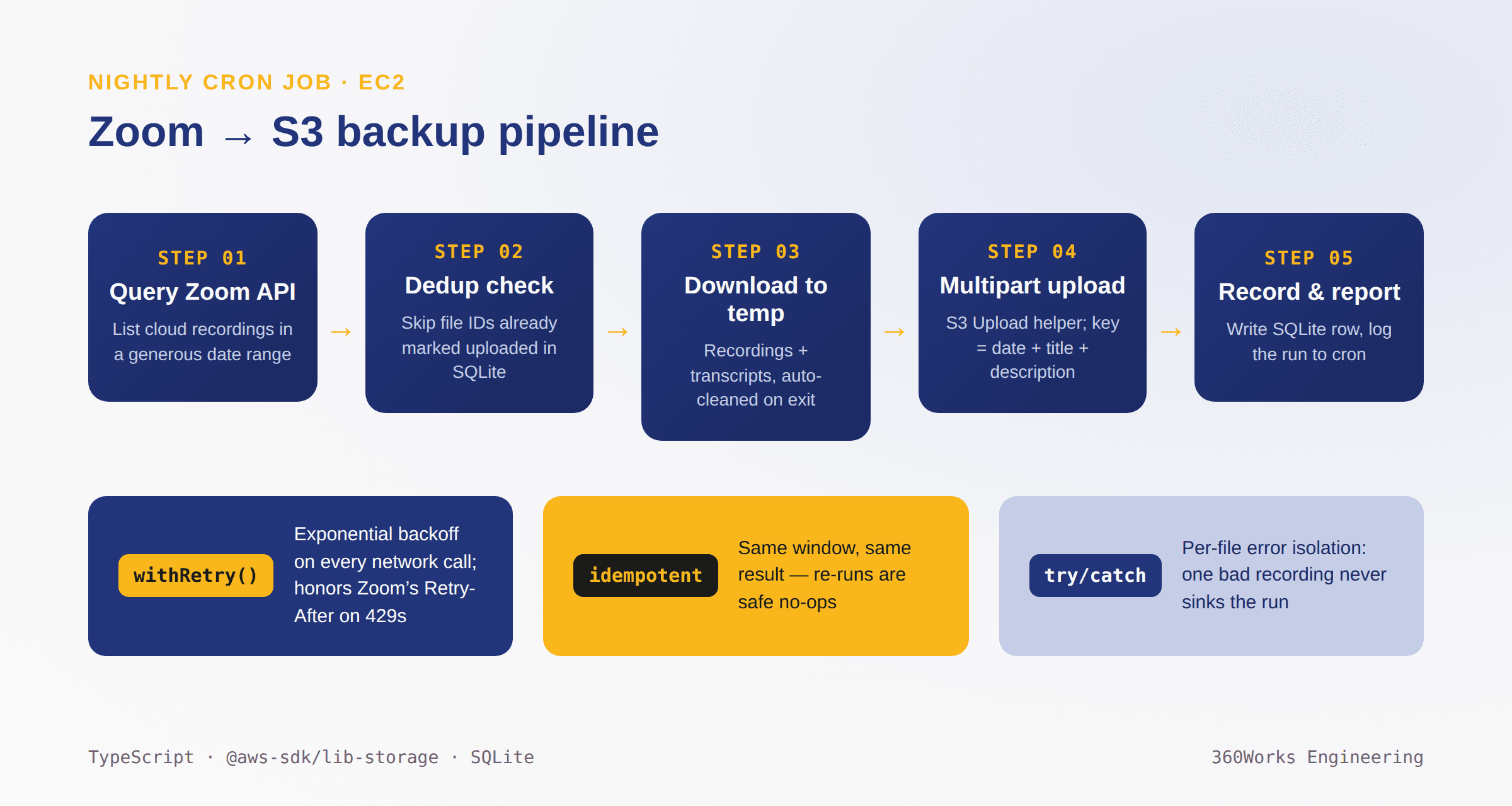
The tool runs as a nightly cron job on an EC2 instance. Each run walks through five steps:
- Query Zoom for all cloud recordings in a date range
- Download each recording and transcript to a temporary directory (deleted when the run completes, or fails)
- Upload to S3, using the meeting date, title, and description as the object key
- Record the upload in SQLite, so future runs know this recording is done
- Write a report of everything uploaded to the cron log
Two APIs do the heavy lifting: the Zoom Developer Platform API (developers.zoom.us/docs/api) for listing and downloading recordings, and the AWS SDK for JavaScript (aws.amazon.com/sdk-for-javascript) for the S3 side. You'll need accounts and credentials for both.
Initial setup: credentials for two clouds
On the Zoom side, you create a developer account and a custom app in the Zoom Marketplace. That gets you an API client ID and client secret.
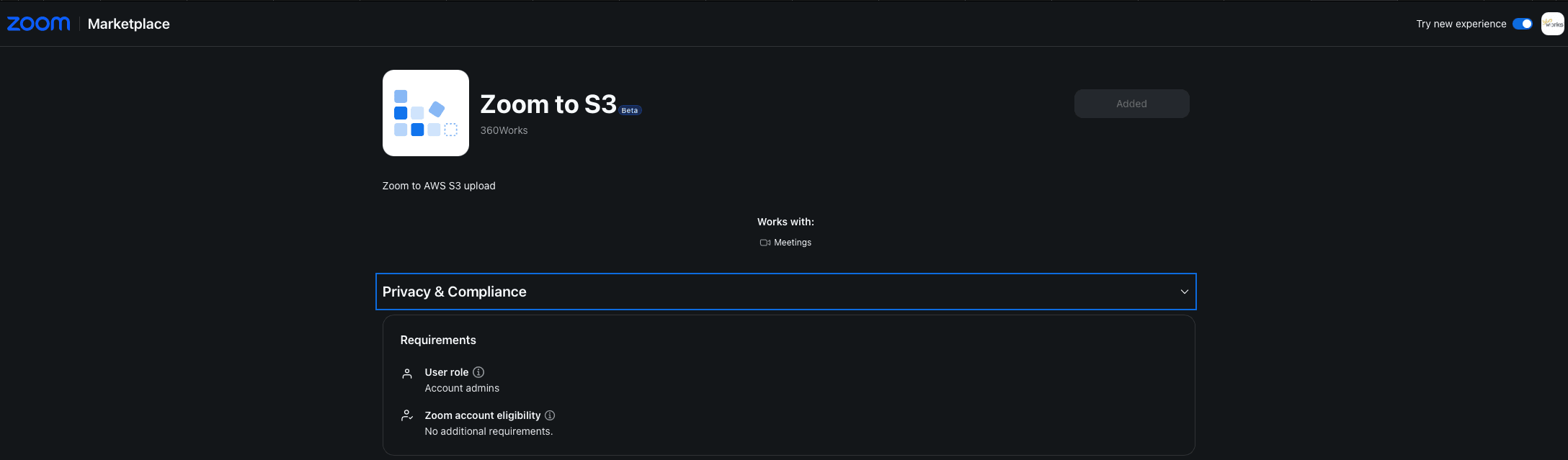
Downloading all recording files, transcripts included, requires specific scopes from the Recording section of the app's scope list. These are the ones the tool uses:
cloud_recording:read:list_recording_files:admin
cloud_recording:read:list_account_recordings:admin
cloud_recording:read:recording:admin
cloud_recording:read:list_user_recordings:admin
cloud_recording:read:meeting_transcript:admin
On the AWS side, you need an S3 bucket name, a region, and credentials. I started with a .env file holding both sets of secrets. For the AWS half I later switched to system credentials, since the tool runs on an EC2 instance anyway. That leaves fewer long-lived AWS secrets sitting in the environment file.
Why multipart uploads matter for video files
Zoom recordings are video files that can run into the gigabytes, and this shaped the most important SDK decision in the project: using the Upload helper from @aws-sdk/lib-storage instead of a plain PutObject call.
import { Upload } from "@aws-sdk/lib-storage";
import { S3Client } from "@aws-sdk/client-s3";

const upload = new Upload({
  client: new S3Client({ region: process.env.AWS_REGION }),
  params: {
    Bucket: bucketName,
    Key: objectKey, // meeting date + title + description
    Body: fileStream,
  },
});

await upload.done();
A single PutObject call holds the entire object in one request. The Upload helper switches to S3 multipart upload once a file crosses 5 MB, splitting it into parts that upload independently. The payoff shows up in failure recovery rather than raw speed: when one part fails mid-transfer, only that part retries. The other several gigabytes stay put. I hit a few upload failures in testing, and the tool resumed from the failed part instead of restarting the entire upload.
Idempotency: the same run twice produces the same result
The cron job asks Zoom for "recordings from date X to Y," and that window is deliberately generous. We utilize a full week's range, on a daily schedule, so it always overlaps the previous run. The same recording can show up in multiple queries.
Before downloading anything, the processor checks SQLite: is this Zoom file ID already marked as uploaded? If yes, skip it. No re-download, no wasted bandwidth, no duplicate S3 PUT costs. Running the job twice over the same window produces the same S3 state as running it once. That property means I can widen the date range, re-run a failed night manually, or overlap windows for safety, and the worst case is a fast no-op.
Here's what a repeat run looks like in practice: two meetings retrieved, eight files, all skipped, zero errors, done in half a second.
[16:46:56.280] INFO: Processing recordings
    from: "2026-05-20"  to: "2026-06-01"  dryRun: false
[16:46:56.798] INFO: Meetings retrieved
    meetingCount: 2
[16:46:56.799] INFO: Skipping already-uploaded file
    fileId: "0c6df1cc-a762-410f-90e7-32aea7793124"
[16:46:56.799] INFO: Skipping already-uploaded file
    fileId: "f3c2cf5f-c52b-4d77-815c-8a6e50a287f9"
    ... 6 more skipped ...
[16:46:56.799] INFO: Processing complete
    uploaded: 0  skipped: 8  errors: 0
One retry helper to rule them all
Network calls fail, zoom will rate limit you, and sometimes even the mighty AWS S3 has its moments. Rather than each call handling retries ad hoc, one withRetry function wraps every outbound request:
async function withRetry<T>(fn: () => Promise<T>, attempts = 3): Promise<T> {
  let delay = 1000;
  for (let i = 1; i <= attempts; i++) {
    try {
      return await fn();
    } catch (err) {
      if (i === attempts) throw err;
      const retryAfter = getRetryAfterMs(err); // honor Zoom's Retry-After on 429s
      await sleep(retryAfter ?? Math.min(delay, 30_000));
      delay *= 2;
    }
  }
  throw new Error("unreachable");
}
Three attempts, doubling delay, capped at 30 seconds. The helper also respects the Retry-After header Zoom sends on rate-limit (429) responses, which keeps the tool a polite API citizen and avoids escalating throttling.
Per-file error isolation
A nightly run processes recordings from many meetings. Early on I decided one bad file should never sink the whole night: the main loop catches and logs a failure on any single recording, then moves to the next one. The failed recording stays unmarked in SQLite, so the next run picks it up again. Combined with idempotency, recovery from a partial failure usually requires no manual intervention.
The trade-off we accepted: SQLite over Postgres
SQLite backs a single table with one job: deduplication across runs. The whole schema fits on a napkin:
CREATE TABLE processed_files (
  id            TEXT PRIMARY KEY,   -- Zoom's own recording file ID
  meeting_id    TEXT NOT NULL,
  s3_key        TEXT NOT NULL,
  uploaded_at   TEXT NOT NULL,
  file_size     INTEGER,
  status        TEXT NOT NULL       -- 'uploaded' | 'error'
);
It fits because exactly one instance of the tool runs against one database file. If we ever scaled to multiple concurrent workers, SQLite's single-writer model would become a real constraint, and a networked store like Postgres or DynamoDB would be the right call. For a single nightly cron job, the trade-off costs nothing and spares us a database server.
That kind of reasoning shaped the whole project. Every component is the simplest thing that survives failure: SQLite over a database server, one retry helper over scattered retry logic, and a temp directory that cleans itself up over persistent staging storage.
What's next
The natural extension is retention: automatically deleting Zoom-side recordings after a set period, say a month, once we've confirmed they're safe in S3. That would close the loop and make our Zoom storage cleanup fully automatic.
The AWS SDK and Zoom API were both a pleasure to work with. With a handful of deliberate choices around retries, idempotency, and error isolation, a lightweight script became a robust piece of software we trust to run unattended.
The code is on GitHub: github.com/360works/zoom-to-s3
FAQs
Create a custom app in the Zoom Marketplace to get an API client ID and secret, add the recording scopes from the Recording section, then call the Zoom API's recording endpoints to list recordings by date range and download each file, transcripts included.
Use the Upload helper from @aws-sdk/lib-storage rather than PutObject. It automatically switches to multipart upload above 5 MB, so a failed part retries on its own instead of restarting a multi-gigabyte transfer.
Track uploaded recordings by their Zoom file ID in a small database (SQLite works for a single worker). Check the ID before downloading; skip anything already recorded. This makes repeated runs idempotent.
Wrap API calls in a retry helper with exponential backoff and honor the Retry-After header Zoom includes on 429 responses. Three attempts with a doubling delay capped at 30 seconds covers most transient failures.
S3 storage costs a fraction of Zoom's, and moving recordings to your own bucket gives you control over retention, naming, and access. A scheduled tool keeps the migration automatic.
Julian Robinson is a software engineer at 360Works, where we build integration tools and plugins that connect platforms like Claris FileMaker to the rest of the world. If you like reading about pragmatic engineering, keep an eye on this blog.