
360Works Announces CloudMail 4.3 with New Automated Unsubscribe Feature
 Will SlaughterCTO
CloudMail 4.3 Released
New Automated Unsubscribe Feature

360Works CloudMail is the best FileMaker email plugin for sending mass HTML emails from FileMaker with images while receiving analytics tracking for your email campaigns targeted to specific audiences.
In an effort to combat spam mail, major email providers continue to make stricter requirements for email campaigns. Google and Yahoo will block any campaign in which 15 out of 5,000 recipients report the email as spam. The best defense against being reported for spam is a convenient unsubscribe option.
With our latest version CloudMail 4.3, we've introduced a new software unsubscribe feature. Now, recipients will see a button in their email client which will unsubscribe them from your email campaign.
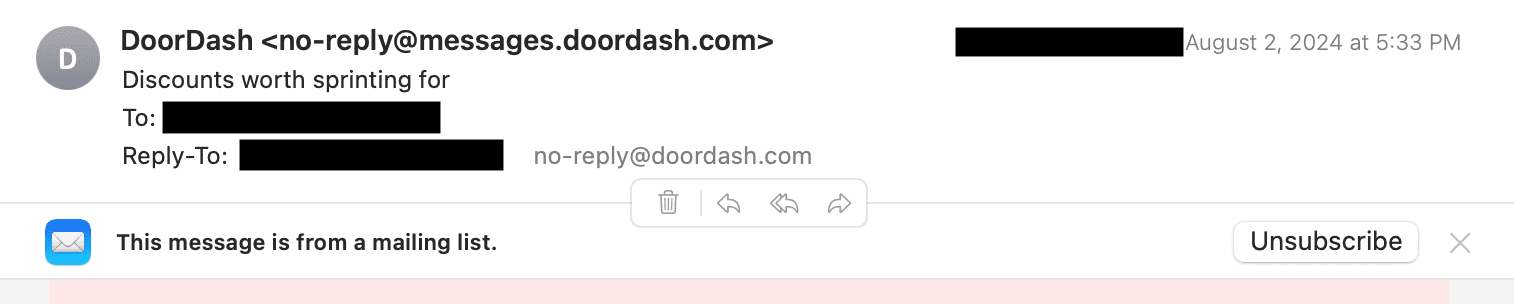
For more information about the list-unsubscribe feature, reference the documentation here.
Here are some additional strategies you can use with CloudMail to make sure your campaigns reach their intended recipients:
- Authenticate your email by setting up SPF and DKIM for your domain: Gmail and Yahoo will expect you to set up DKIM for your sending email address. This means that the sending email address will have to come from a domain that you own. For instance, if you own a site at samplewebsite.com, you can verify ownership of that domain to send emails from sampleuser@samplewebsite.com. For instruction on setting up DKIM and SPF, visit this page.
- Make sure your in-email unsubscribe links are easy to find. People expect an in-email unsubscribe link to be at the bottom of the email and easy to find. For instruction on how to add an unsubscribe link, follow our documentation here.
- Target your campaigns: personalize your emails, style them with CloudMail's HTML support, and make sure to avoid excessive sending.
If you need help authenticating your email sending address against a domain, please contact us at support@360works.com.
Download CloudMail 4.3